Pornind de la precedentul articol vom incerca si folosirea unui display 128*64 pixeli dar cu conectare pe interfata SPI. Displayul se conecteaza pe interfata SPI0 si se alimenteaza cu o tensiune de +3V3.
La fel ca in precedentul articol avem nevoie de libraria ssd1306.py.
Conexiunile dintre display si raspberry Pi Pico sunt cele de mai jos:
Display OLED --- Raspberry Pi Pico
GND - GND
VCC - 3V3
D0 - GPIO18 (Pin 24)
D1 - GPIO19 (Pin 25)
RES - GPIO20 (Pin 26)
DC - GPIO17 (Pin 22)
CS - GPIO16 (Pin 21)
O poza cu displayul se poate vedea mai jos:
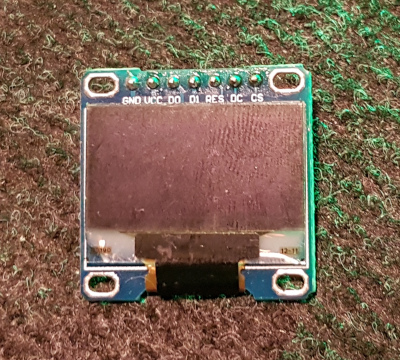
Codul sursa folosit pentru testarea displayului este cel de mai jos:
from machine import Pin, SPI
from ssd1306 import SSD1306_SPI
import framebuf
import utime

spi = SPI(0, 100000, mosi=Pin(19), sck=Pin(18))
oled = SSD1306_SPI(128, 64, spi, Pin(17), Pin(20), Pin(16))

buffer = bytearray(b"\x00\x00\x00\x00\x00\x00\x00\x00\x00\x00\x00\x00\x00|?\x00\x01\x86@\x80\x01\x01\x80\x80\x01\x11\x88\x80\x01\x05\xa0\x80\x00\x83\xc1\x00\x00C\xe3\x00\x00~\xfc\x00\x00L'\x00\x00\x9c\x11\x00\x00\xbf\xfd\x00\x00\xe1\x87\x00\x01\xc1\x83\x80\x02A\x82@\x02A\x82@\x02\xc1\xc2@\x02\xf6>\xc0\x01\xfc=\x80\x01\x18\x18\x80\x01\x88\x10\x80\x00\x8c!\x00\x00\x87\xf1\x00\x00\x7f\xf6\x00\x008\x1c\x00\x00\x0c \x00\x00\x03\xc0\x00\x00\x00\x00\x00\x00\x00\x00\x00\x00\x00\x00\x00")
fb = framebuf.FrameBuffer(buffer, 32, 32, framebuf.MONO_HLSB)

while True:
    oled.fill(0)
    oled.blit(fb, 0, 0)
    oled.show()
    utime.sleep(1)
    oled.poweroff()
    utime.sleep(1)
    oled.poweron()
    oled.fill(0)
    oled.text("www.", 0, 0)
    oled.text("electronicstore", 5, 10)
    oled.text(".ro", 105, 20)
    oled.show()
    utime.sleep(1)
    oled.poweroff()
    utime.sleep(1)
    oled.poweron()